
How to Update Your Account & Player Profile
T-shirt Size is in your PLAYER Profile. See the steps below to update your PLAYER settings.
To ensure you get timely and relevant messages from Hockey Finder, please check that your contact information is correct. Both your ACCOUNT and your PLAYER profile need to be accurate.
Please log in to your account and confirm or amend any details as necessary.
Log in to www.hockeyfinder.com/account/ and confirm your information is accurate.
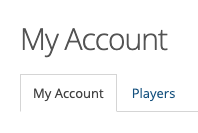
If any of the following is missing, please add:
- Your Role with Hockey Finder. Select all that apply
- Full address (street, city, state, zip)
- Phone number
*Note that all the required fields (including Role, First Name, Last Name, Postal Code, Phone, and Email) must be filled out. Failure to add your info in any field will prevent the update to save.
Player Profile - Email, Phone, T-shirt Size
While in your Account, click on the Players tab and review the information of all players in your account.
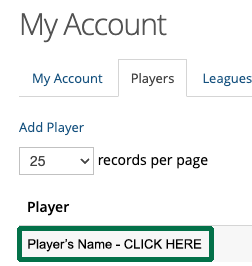
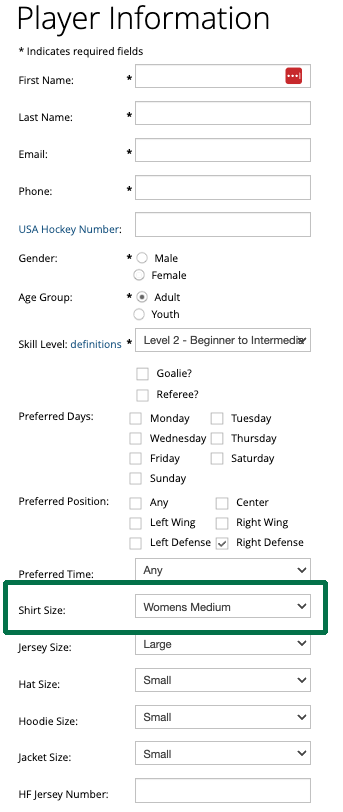
Please click on each player associated with your account and check that all fields are correct:
- Phone
- Gender
- Preferred Position
- Shirt Size - T-shirt Size
- Jersey Size
- Hat Size
- Hoodie Size
- Jacket Size
Finally, if you know you have multiple accounts or additional players you would like removed, please let us know. Email us at [email protected] with your request, and we'll take care of it immediately.
We appreciate your time and effort in keeping your account updated. Thank you for being an integral part of the Hockey Finder Community!
T-shirt Size Chart
